Are we still using humans to do complex repetitive work in the age of robots and Artificial Intelligence? Well, you might be missing out on two of the most popular technologies, Robotic Process Automation (RPA) and Artificial Intelligence (AI). Both technologies help businesses enhance their operations, increase customer satisfaction, and reduce operational costs. While both software programs help businesses automate repetitive and complex tasks, they have distinct features. Let’s understand it better.
What is Robotic Process Automation (RPA)?
Robotic Process Automation (RPA) uses software robots, or bots, to minimize human labor and maximize efficiency by completing simple, high-volume, repetitive, and rule-based tasks. As part of Automation Software Development, these bots can help businesses automate and simplify tasks such as clicking buttons, entering data, sending emails, copying information between systems, and more, mimicking human actions.
What is Artificial Intelligence (AI)?
As the workload increases, the organization requires more humans. While a business does need humans, they cannot work 24×7; that’s when AI comes into play. Artificial Intelligence (AI) is a technology that simulates human intelligence by understanding different languages, recognizing patterns, and solving problems on its own, reducing the need for humans.
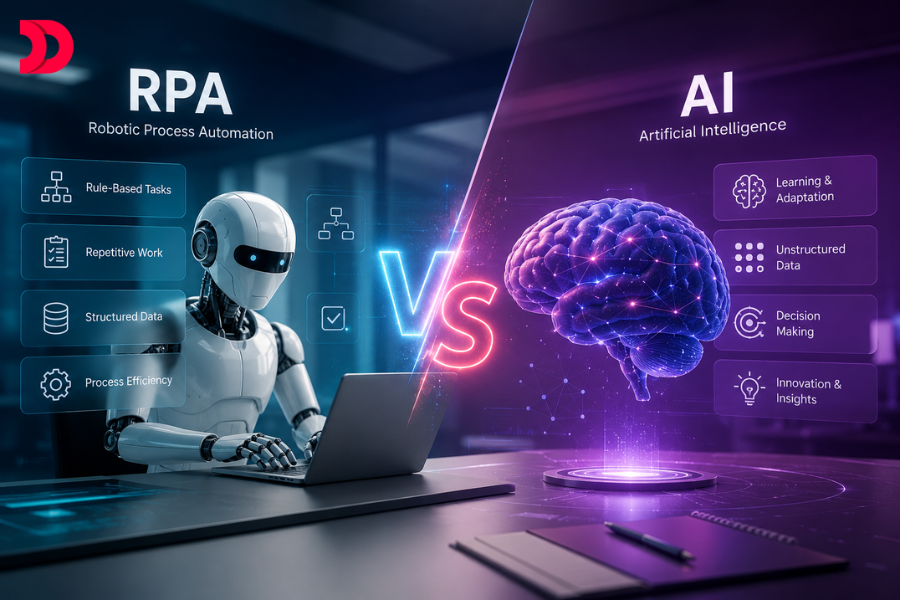
RPA vs. AI at a Glance
Both RPA and AI have their own unique features. While RPA works as the hand of a human that carries out simple and repetitive tasks, AI works as the brain of a human that performs tasks that require planning, understanding, reasoning, and decision-making.
How RPA Works
RPA bots are created to complete repetitive tasks by replicating human actions and interactions. Businesses should implement Robotic Process Automation Services to automate workflows.
Trigger: The automation process starts with the trigger, which can be anything like an invoice email, a specific time, or a person clicking a button.
Execution: The bots work via software scripts or software robots (bots) following rule-based tasks with different software applications to extract data, fill out forms, move files, and transfer data.
Output: The bot will finish the tasks given by the user with 100% accuracy and work 24×7 without breaks or errors, helping businesses to work smarter and faster.
How AI Works
Unlike RPA bots, which only work with a set of workflows and instructions, AI, on the other hand, understands, improvises, takes actions, and offers recommendations on its own.
Data Collection: The AI finds a large quantity of data, such as text, data, and numbers, from different sources.
Learning process: AI identifies patterns, information, language, images, and answers questions, provides recommendations, and solves problems within its own capabilities, mimicking the human brain.
Output and improvement: AI constantly improves with new information and learns from its mistakes, offering more accurate results over time.
Key Differences Between RPA and AI
| Robotic Process Automation (RPA) |
Artificial Intelligence (AI) |
| Follows rule-based, repetitive tasks |
Uses its own creativity, judgment, and prediction to make decisions independently |
| RPA mimics Human actions |
Artificial Intelligence mimics human intelligence |
| RPA only follows the assigned tasks and cannot make its own decisions. |
AI replaces human work |
| RPA bots are easier to implement |
Implementing AI is harder as it requires learning and data |
| RPA works with structured data only, like spreadsheets, forms |
AI works with Unstructured data only, such as free text, voice, and images |
| RPA automates repetitive, rule-based tasks without intelligence |
AI incorporates Machine Learning and NLP to perform intelligent tasks. |
| The small UI updates in RPA can break the execution path |
While AI can adjust to new changes and information |
When Should You Use RPA?
RPA can be useful if your work is repetitive, rule-based, and requires following the same pattern each time. RPA mimics human hands by automating the tasks that do not require human judgement. If the work is high-volume, repetitive, and has low error tolerance, or needs to run continuously, then RPA is a good fit for your business.
However, if your work demands continuous creativity & updates, if the process changes regularly or needs complete human judgement, then RPA will not be the best choice for your organization. Hire RPA Developers Today to design, implement, and scale automation effectively.
When Should You Use AI?
Artificial Intelligence (AI) can be useful if your work requires human intelligence. AI collects, learns, understands from data, predicts, modifies, decides, and handles complex tasks on its own. Rather than just following the same pattern offered by humans, AI recognizes patterns, understands language & images, and takes action to support better decisions and improve from mistakes & feedback 24/7. Hire AI Developers to create, train, and optimize AI-powered applications.
Four concepts of Artificial Intelligence (AI):
- Navigation Systems
- Limited Memory Machines (ChatGPT)
- Machine Learning
- Self Awareness
Can RPA and AI Work Together?
Yes, the combination of RPA and AI goes hand-in-hand. Using RPA will help to take care of the repetitive, high-volume tasks, while AI will help to complete the tasks that require decision-making power. While both technologies has its own benefits, using both together can help automate business processes and improve operational efficiency.
RPA is an excellent technology to help complete repetitive and rule-based tasks such as filling out forms, transferring data from one system to another, sending emails, copying data, and so on. Combining it with AI helps to analyze data, recognize patterns, understand the language & tone, predict and modify the data. Contact a trusted AI Development Company to accelerate your digital transformation with Intelligent Automation.
Benefits of RPA
- Reduced Costs
- Improved stability
- Better security
- Improved analytics for workflow management
- Enhanced customer interaction
- Effective use of staff resources
- A larger staff
- Work 24/7
- Integrates with existing systems
Benefits of AI
- Efficiency & Accuracy
- Improves decision making
- Improved predictions
- Advancements in Medicine & Healthcare
- Make Autonomous vehicles
- Improved accessibility for people with disability
- Reduces Human Efforts
Challenges of RPA
- Bots cannot learn, understand, or make future predictions
- High bot maintenance costs
- Fragile processes
- Mimics human work, not its intelligence
- It works best with structured data
Challenges of AI
- AI learns from data, and if the data is wrong, AI can make a wrong decision.
- AI tracks personal data, face, voice, and browsing habits, raising privacy concerns.
- If AI makes mistakes that are hard to explain, it leads to a lack of transparency.
- AI systems can be hacked or misused, creating security risks.
- Requires skilled professionals and advanced technology for complex AI setup.
Cost Comparison 2026
| Category |
Initial Costs |
Monthly Costs |
ROI Timeframe |
| RPA (Make/n8n) |
$0 – $1,000 |
$50 – $300 |
1 – 4 months |
| Enterprise RPA (UiPath) |
$10,000 – $50,000 |
$1,000 – $4,000 |
6 – 18 months |
| No-Code AI Tools |
$500 – $5,000 |
$200 – $1,000 |
2 – 6 months |
| Custom AI Automation |
$5,000 – $100,000 |
$500 – $3,000 |
6 – 24 months |
Ready to Automate Your Business with RPA or AI?
Choosing between Robotic Process Automation (RPA) and Artificial Intelligence (AI) doesn’t have to be complicated. Whether you need to automate repetitive workflows, build intelligent AI-powered applications, or combine both for end-to-end business automation, the right technology depends on your business goals.
At DevsTree, we help organizations identify the best automation strategy, develop scalable solutions, and integrate them seamlessly with existing systems. From workflow automation and AI agents to predictive analytics and enterprise automation, our experts deliver solutions that improve efficiency, reduce operational costs, and accelerate digital transformation.
Our Expertise Includes:
- Robotic Process Automation (RPA) Development
- AI & Machine Learning Solutions
- Intelligent Document Processing
- AI Agent Development
- Workflow Automation
- Custom Automation Software Development
- Enterprise AI Integration
Transform Your Business with Intelligent Automation
Whether you’re looking to eliminate repetitive manual tasks or build AI-powered decision-making systems, our team is ready to help.
Schedule a Free Automation Consultation Today and discover how AI and RPA can streamline your operations, increase productivity, and deliver measurable ROI.
Contact DevsTree today to build smarter, faster, and more efficient business processes.











 Sep 28, 2026