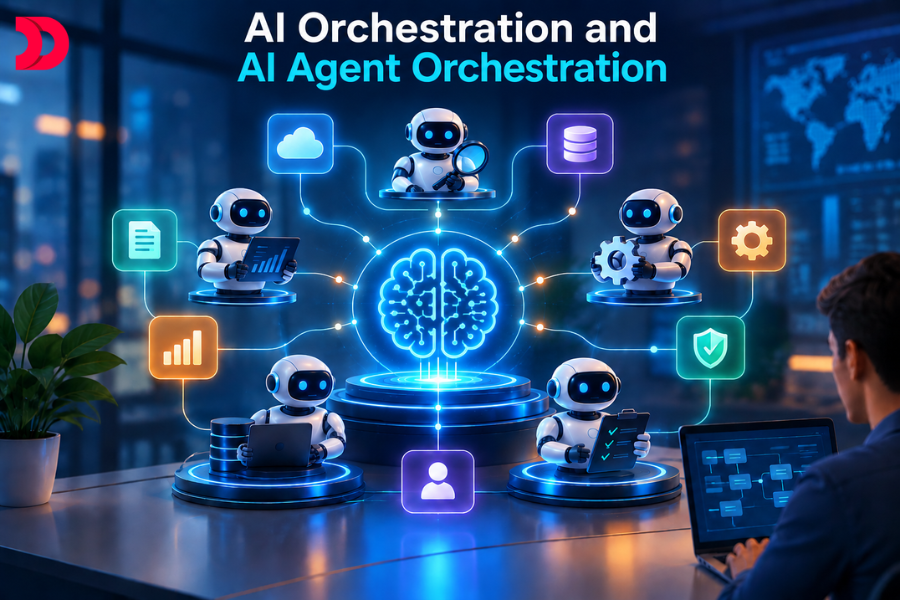
AI orchestration is the coordination layer that connects AI models, AI agents, tools, APIs, data, workflows, memory, and enterprise systems so they can work together toward a defined business outcome. AI agent orchestration is a more specific concept that focuses on coordinating multiple specialized AI agents, deciding which agent should handle a task, what context it receives, which tools it can use, and how its output is passed to other agents or systems. As AI applications become more complex, orchestration helps turn individual AI capabilities into structured, controllable, and production ready workflows.
Key Takeaways
AI orchestration is broader than AI agent orchestration. It can coordinate models, agents, workflows, tools, APIs, data sources, and business applications.
AI agent orchestration focuses on managing the interaction between multiple AI agents.
A multi-agent system is not automatically an effective orchestration system. Reliable orchestration requires task routing, context management, state handling, validation, permissions, monitoring, and recovery.
Businesses do not always need multiple agents. A well designed single agent or deterministic workflow can sometimes solve a problem more effectively.
Production AI orchestration requires a balance between autonomous AI behavior and deterministic software controls.
What Is AI Orchestration?
AI orchestration is the process of coordinating different AI and software components so they can collectively complete a larger task or business workflow.
Those components may include foundation models, AI agents, APIs, databases, knowledge bases, workflow engines, external services, business applications, memory systems, and human approval steps.
The easiest way to understand the concept is to separate intelligence from coordination.
An AI model provides reasoning or content generation.
An AI agent combines a model with instructions, tools, context, and the ability to perform tasks.
A database provides structured information.
An API allows the system to interact with another application.
A knowledge base provides information that may be retrieved when needed.
The orchestration layer determines how and when those components work together.
For example, consider an enterprise customer who asks why a payment was declined.
The system may need to identify the customer’s intent, retrieve account information, check payment records, review company policy, determine whether the issue can be resolved automatically, and prepare a response.
The language model alone does not perform the entire business process.
Orchestration connects the different components required to complete it.
Businesses moving toward connected AI driven workflows may also combine this architecture with agentic workflow automation to automate more complex processes involving AI agents, business logic, and enterprise integrations.
AI Orchestration vs Traditional Automation
Traditional automation generally follows predefined rules.
For example:
- A customer submits a form.
- The system validates required fields.
- The information is stored in a database.
- An email notification is sent.
- The process follows predictable instructions.
AI orchestration becomes useful when the system needs to interpret ambiguous input, select between different actions, reason about information, or adapt the workflow according to the situation.
Consider a customer saying:
“My payment failed twice, but I was charged once. I also cannot access my account.”
A traditional workflow may struggle because the input does not fit a single predefined category.
An orchestrated AI system can identify multiple intents, retrieve the required data, investigate the payment status, inspect account information, and determine which workflow should continue.
This does not mean AI orchestration replaces traditional automation.
In many effective enterprise systems, AI makes the decisions that require interpretation while conventional software executes deterministic actions.
AI Orchestration vs Workflow Orchestration
Workflow orchestration focuses primarily on coordinating business processes, application services, jobs, and predefined execution steps.
AI orchestration includes many of the same concepts but adds AI specific responsibilities such as model selection, prompt and context handling, agent coordination, tool calling, output validation, and dynamic decision making.
For example, a conventional workflow may specify:
- Step one retrieves customer data.
- Step two checks payment information.
- Step three sends an email.
An AI orchestration system may instead determine:
- Identify customer intent.
- Select the correct specialist.
- Retrieve relevant information.
- Allow the specialist to use approved tools.
- Validate the output.
- Determine whether another agent is needed.
- Escalate to a human when predefined conditions are met.
In production environments, AI orchestration and workflow orchestration often work together rather than functioning as competing technologies.
AI Orchestration vs AI Agent Orchestration
AI orchestration is the broader concept.
AI agent orchestration is a specialized form of orchestration focused on AI agents.
An AI application can use orchestration without multiple agents.
For example:
User request → LLM → RAG system → CRM API → response
This is AI orchestration.
A more complex architecture might use:
User request → triage agent → billing agent → knowledge agent → validation agent → response
That is AI agent orchestration.
The distinction becomes important when organizations decide how much architectural complexity they actually need.
A company should not introduce multiple agents simply because multi agent systems are technically possible.
The number of agents should be driven by the complexity of the business problem.
What Is AI Agent Orchestration?
AI agent orchestration is the coordination of multiple AI agents that have distinct responsibilities but contribute to a shared objective.
- Each agent may specialize in a particular domain.
- One agent may classify requests.
- Another may retrieve customer data.
- Another may analyze financial information.
- Another may search for enterprise knowledge.
- Another may validate the final output.
The orchestration system connects these agents and determines how the work progresses.
Organizations building this type of architecture can use AI agent development services to create custom agents that work with APIs, enterprise data, retrieval systems, memory, and business applications.
Task Decomposition
Complex tasks often contain several smaller tasks.
For example, preparing a supplier risk assessment may require:
- Financial analysis.
- Contract review.
- Security analysis.
- Supplier research.
- Risk scoring.
- Final validation.
The orchestrator can divide the larger request into these smaller activities and assign them to appropriate agents.
Task Routing
Task routing determines which agent should handle a particular task.
A customer service request about an invoice should go to a billing capability.
A problem with a software deployment should go to an IT or technical support capability.
A request requiring policy interpretation may need a knowledge or compliance workflow.
Effective routing prevents every agent from trying to solve every problem.
Context Sharing
An agent should receive enough context to complete its task, but not necessarily the entire history of the workflow.
Useful context may include:
- Customer identifier.
- Task description.
- Previous agent findings.
- Retrieved documents.
- Tool results.
- Current workflow state.
- Unresolved issues.
This allows agents to continue the process without forcing users to repeat information.
Memory and State Management
Memory and state are related but not identical.
Memory generally refers to information that can persist beyond the immediate operation.
State represents the current condition of a workflow.
For example:
- customer_verified = true
- invoice_verified = true
- refund_required = true
- human_approval_required = false
Keeping workflow state explicit makes orchestration easier to monitor, debug, and recover.
Tool Calling
AI agents often need external tools.
These may include:
- CRM APIs.
- Payment systems.
- Databases.
- Search services.
- Ticketing platforms.
- Inventory systems.
- Internal enterprise applications.
The orchestration architecture should determine what each agent is allowed to access.
A billing agent may need payment APIs.
A knowledge agent may only need access to approved documentation.
A customer support agent may need CRM data but not payment execution privileges.
Validation and Quality Checks
AI output should not automatically be treated as correct.
A validation step can check:
- Whether required fields are present.
- Whether a result follows the expected schema.
- Whether information is supported by retrieved data.
- Whether a proposed action violates a business rule.
- Whether confidence or risk thresholds require escalation.
Critical actions should often combine AI reasoning with deterministic validation.
Error Handling and Retries
Production systems must assume failures will happen.
An API can time out.
A model can return invalid structured data.
An agent can misunderstand a task.
A retrieval system can fail to find appropriate information.
The orchestrator needs explicit retry, timeout, fallback, and escalation rules.
Human in the Loop
Some actions should not be completely autonomous.
Financial transfers, sensitive customer changes, production deployments, compliance decisions, and other high consequence operations may require human approval.
The orchestration system can pause the workflow, present the relevant information to a human, and resume only after approval.
How Does AI Agent Orchestration Work?
A typical workflow can be represented as:
User request → Orchestrator → Intent analysis → Specialist agent → Tool or API → Validation → Another agent → Final response → Human escalation when required
Consider an enterprise customer asking:
“I was charged twice, one payment looks incorrect, and I want to know whether my account will be suspended.”
Step 1: Customer request
The application receives the message and associates it with the customer’s account and session.
Step 2: Intent analysis
- The triage agent identifies two main concerns.
- The first involves billing.
- The second involves account status.
Step 3: Task decomposition
- The orchestrator separates the work into independent tasks.
- Verify payment activity.
- Retrieve account status.
- Retrieve relevant account policy.
Step 4: Parallel execution
- The billing agent checks the payment platform while the account agent retrieves customer status.
- Running independent operations in parallel can reduce overall latency.
Step 5: Knowledge retrieval
- A knowledge agent retrieves the relevant billing and account policies.
- For organizations building knowledge driven AI systems, RAG and LLM development can support retrieval based applications where AI responses need access to trusted business information.
Step 6: Validation
The system validates the payment information against the account data and relevant policy.
Step 7: Response generation
A response agent combines the validated information into a customer friendly explanation.
Step 8: Escalation
- If the payment records conflict or the proposed action falls outside automated policy, the workflow can be routed to a human representative.
- The important point is that orchestration maintains the state and relevant context throughout the workflow.
- The customer should not need to explain the same issue again to every component.
How Companies Orchestrate Multiple AI Agents for Customer Service
Customer service provides a practical example of multi agent orchestration.
Imagine a large support platform with several specialized AI capabilities.
The customer sends a request.
- A triage agent identifies the intent and urgency.
- A customer data agent retrieves account information.
- A billing agent investigates payments, invoices, refunds, and failed transactions.
- A technical support agent investigates product related issues.
- A knowledge agent retrieves relevant documentation.
- A resolution agent prepares a response.
- A quality control component validates the response.
- A human support representative handles sensitive or complicated cases.
The customer experiences one conversation even though several specialized components may be involved behind the scenes.
That continuity is one of the main benefits of orchestration.
The billing agent does not need to ask the customer for information already collected by the customer data agent.
Instead, it receives the relevant structured context from the orchestration layer.
AI Agent Orchestration Architecture
A production AI orchestration architecture may contain several layers.
User and Application Layer
This is the interface through which the request enters the system.
Examples include websites, mobile applications, employee portals, voice interfaces, customer support platforms, and enterprise applications.
Orchestration Layer
The orchestration layer controls:
- Task routing.
- Workflow execution.
- Agent handoffs.
- Context propagation.
- State management.
- Retries.
- Timeouts.
- Human approvals.
- Stopping conditions.
This is the control center of the system.
AI Agent Layer
Each agent has a specific responsibility.
A well designed agent should have clearly defined instructions, tools, permissions, inputs, outputs, and boundaries.
LLM and Foundation Model Layer
Agents rely on language models for reasoning, classification, extraction, generation, planning, or evaluation.
Different agents do not necessarily need the same model.
A lightweight classification task may use a smaller model while a complex reasoning task may use a more capable model.
Tools and APIs
Agents can interact with enterprise systems through APIs and approved tools.
This is what allows AI to move from generating information to participating in business processes.
Knowledge and RAG Layer
Retrieval augmented generation, commonly called RAG, allows an application to retrieve relevant information before generating a response.
This can include:
- Internal documentation.
- Product information.
- Company policies.
- Contracts.
- Technical manuals.
- Knowledge articles.
- Business data.
Database and State Layer
Databases may store customer records, workflow state, task results, audit information, configuration, or application data.
Memory Layer
Memory can preserve information across workflow stages or longer user interactions where persistence is necessary.
Workflow Engine
A workflow engine can provide deterministic execution, scheduling, retries, durable state, and integration with enterprise processes.
Monitoring and Observability Layer
Production AI systems need detailed observability.
Teams should be able to determine:
- Which agent ran.
- Which tools were used.
- What data was retrieved.
- How long each step took.
- How much the execution cost.
- Where an error occurred.
- Why the workflow stopped.
Tracing and operational monitoring become particularly important as the number of agents and model calls increases.
Security and Permissions
Every agent should have the minimum permissions required for its role.
An agent that reads invoices does not necessarily need permission to issue refunds.
An agent that analyzes production logs should not automatically have permission to deploy software.
Security must therefore exist at the tool and workflow level, not only at the user interface.
Human Approval Layer
High risk actions can be routed to authorized employees for review.
This creates a controlled boundary between autonomous execution and human decision making.
Types of AI Agent Orchestration
Different problems require different orchestration patterns.
Sequential Orchestration
Agents execute in a specific order.
For example:
Research agent → analysis agent → writing agent → review agent
This is suitable when each stage depends on the previous stage.
Its disadvantage is increased latency when tasks could have been performed simultaneously.
Parallel Orchestration
Independent tasks execute at the same time.
For example, finance, security, and compliance agents can separately analyze a proposed supplier.
Their results can then be combined by a final synthesis component.
Parallel execution can reduce latency, but the system needs clear aggregation and conflict resolution.
Supervisor or Manager Orchestration
A central manager decides which specialist to call and controls the overall interaction.
This works well when one component needs to maintain overall context and coordinate specialist capabilities.
Hierarchical Orchestration
A top level orchestrator manages domain specific supervisors.
For example:
- Enterprise orchestrator.
- Customer operations supervisor.
- Billing supervisor.
- Technical support supervisor.
- Knowledge supervisor.
This structure can be useful in large enterprise environments where responsibilities naturally divide into business domains.
Router Based Orchestration
A routing component determines which capability should handle the request.
For example:
- Billing request → billing agent.
- Technical issue → technical support agent.
- Refund request → refund workflow.
This pattern works well when request categories are clearly defined.
Event Driven Orchestration
An event triggers downstream actions.
For example:
Payment fails → billing investigation → risk evaluation → customer notification
This pattern works particularly well for asynchronous enterprise operations.
Collaborative Multi Agent Orchestration
Agents can communicate more directly and contribute independently toward a common objective.
This provides flexibility but introduces additional challenges around coordination, security, conflicting recommendations, and observability.
Human in the Loop Orchestration
A person becomes an explicit part of the workflow.
The system can automatically perform routine steps while requiring human approval before high consequence actions.
What Is an AI Orchestration Platform?
An AI orchestration platform provides infrastructure for building, connecting, managing, monitoring, and governing AI workflows and agents.
An AI chatbot typically focuses on a conversation between a user and an AI model.
An AI orchestration platform manages the larger execution environment around that model.
Depending on the platform, capabilities may include:
- Agent management.
- Workflow design.
- Model routing.
- Tool and API integration.
- Context management.
- Memory management.
- Knowledge retrieval.
- Logging.
- Tracing.
- Evaluation.
- Security.
- Access control.
- Guardrails.
- Human approval.
- Retry handling.
- Error management.
- Cost monitoring.
- Scalability.
- Governance.
This distinction is important.
A chatbot may answer:
- “What is our refund policy?”
- An orchestration system can potentially determine:
- Which customer is asking.
- Which account is involved.
- Which policy applies.
- Whether the customer qualifies for a refund.
- Whether an approved refund action is available.
- Whether human authorization is required.
- Whether the final answer is supported by enterprise data.
That is why AI orchestration platforms are increasingly relevant to production enterprise AI applications.
AI Orchestration vs AI Agent Orchestration vs Multi Agent Systems
| Concept |
Main Purpose |
Typical Scope |
| AI orchestration |
Coordinates AI models, agents, tools, data, workflows, and enterprise systems |
Broad AI applications and business processes |
| AI agent orchestration |
Coordinates the behavior, execution, context, and interactions of AI agents |
Agent driven workflows |
| Multi agent system |
Uses multiple specialized or autonomous agents toward shared or related goals |
Distributed agent collaboration |
The presence of several AI agents does not automatically guarantee effective orchestration.
The orchestration layer provides the control mechanisms that make collaboration useful and manageable.
How CodeRabbit Orchestrates Agents to Strengthen AI Generated Code
CodeRabbit is a useful example of how AI assisted software engineering can combine intelligent analysis with automated verification.
CodeRabbit’s published architecture describes agentic exploration and specialized agents alongside static analysis, security tooling, repository context, and persistent learning capabilities. Its documentation also describes specialized capabilities associated with review, verification, chat, and pre merge checks.
The broader engineering concept is important even beyond a specific product.
An AI coding capability can generate or modify code.
Other systems can inspect the output.
Static analysis can identify deterministic code issues.
Security tools can identify potential vulnerabilities.
Tests can validate expected behavior.
AI based review capabilities can analyze code quality and potential problems.
A human developer can remain responsible for important approval decisions.
This demonstrates why AI orchestration can be valuable in software development.
The strongest architecture does not necessarily treat every operation as an autonomous agent. It combines AI agents with deterministic tools, tests, static analyzers, APIs, and human decision points.
That combination can provide stronger controls than relying on one AI model to generate and approve its own output.
Benefits of AI Orchestration
Better Scalability
Complex processes can be divided into smaller components with clearly defined responsibilities.
Specialized AI Capabilities
Different agents can focus on different areas instead of requiring one large agent to handle every problem.
Better Task Routing
Tasks can be directed toward the model, agent, tool, or workflow best suited to handle them.
Better Context Management
Only the information relevant to a task needs to be passed between workflow stages.
Reduced Manual Work
AI can automate classification, retrieval, investigation, summarization, analysis, and other routine operations.
Faster Execution
Independent work can be executed concurrently.
Better Consistency
Structured workflows and validation can make execution more predictable.
Enterprise Integration
AI can interact with CRM, ERP, payment, support, engineering, finance, and operational systems.
Human AI Collaboration
Employees can focus on exceptions, approvals, judgment, and high impact decisions.
Improved Governance
Central orchestration creates opportunities for logging, auditing, permission management, guardrails, and policy enforcement.
Organizations looking to combine these capabilities with broader business process automation can also consider AI automation solutions for connecting AI capabilities with operational workflows and enterprise systems.
Challenges and Limitations of AI Orchestration
AI orchestration introduces complexity as well as capabilities.
Increased System Complexity
Each additional agent, tool, model, and integration becomes another component that must be monitored and maintained.
Agent Coordination Failures
The wrong agent may be selected or agents may interpret the same task differently.
Hallucinations
A model may generate information that is inaccurate or unsupported by available data.
Error Propagation
An incorrect result from one agent can be passed to downstream agents and appear valid by the time it reaches the user.
Context Management
Too little context can make an agent ineffective.
Too much context can increase cost, latency, and the possibility of distraction from irrelevant information.
Latency
A workflow containing multiple model calls and API requests can take considerably longer than a simple single model interaction.
API Costs
Each model call, retrieval operation, and external API request can contribute to execution cost.
Security and Permissions
More agents and tools create more permission boundaries that must be controlled.
Data Privacy
Sensitive business and customer information must only be available to components that legitimately require access.
Monitoring Difficulty
A single customer request may generate numerous agent executions, tool calls, retrieval operations, and workflow transitions.
Without good tracing, identifying failures can become difficult.
Agent Conflicts
Two agents may produce contradictory recommendations.
The system needs a mechanism for resolving those conflicts.
Reliability
AI systems can be probabilistic.
Critical business processes may therefore require deterministic validation and explicit recovery mechanisms.
Governance and Human Oversight
Organizations must define what AI can decide, what it can execute, and what requires human approval.
Real World AI Orchestration Use Cases
Customer Service
AI agents can handle triage, account investigation, billing, technical support, documentation retrieval, response preparation, and escalation.
Healthcare
AI orchestration can support administrative workflows such as patient intake, scheduling, documentation, information retrieval, and coordination while keeping sensitive decisions under appropriate professional oversight.
Banking and Fintech
Potential workflows include fraud investigation, transaction analysis, compliance operations, customer support, financial document analysis, and risk review.
E Commerce
AI can coordinate product discovery, order management, returns, inventory analysis, customer service, and recommendations.
Software Development
Orchestrated AI can support planning, coding, testing, documentation, security analysis, code review, and issue investigation.
For engineering organizations building these workflows as part of larger production applications, AI application development can provide the application layer around models, agents, APIs, and enterprise systems.
IT Support
AI can classify incidents, search internal knowledge, analyze logs, suggest remediation, update tickets, and escalate complex cases.
Sales
Agents can research accounts, qualify leads, update CRM records, prepare proposals, and coordinate follow up activities.
Marketing
AI agents can support market research, content workflows, campaign analysis, segmentation, reporting, and approval processes.
Supply Chain
Potential workflows include supplier analysis, inventory monitoring, exception handling, demand analysis, and logistics coordination.
Enterprise Operations
AI orchestration can support document processing, procurement, finance operations, employee support, compliance workflows, and internal reporting.
How to Build an AI Orchestration System
1. Define the Business Problem
Start with a measurable outcome.
For example:
Reduce customer support resolution time.
Automate invoice investigations.
Improve software review workflows.
Reduce manual document processing.
2. Identify the Tasks
Break the business process into individual activities.
Determine which tasks require reasoning and which should remain deterministic.
3. Decide Whether Multiple Agents Are Necessary
This is one of the most important architectural decisions.
A single agent may be enough for a straightforward process.
Multiple agents make more sense when the workflow contains clearly different domains, responsibilities, permissions, or reasoning requirements.
4. Define Agent Responsibilities
Every agent should have a clear purpose.
Avoid creating vague agents that attempt to solve unrelated problems.
5. Select Models
Choose models based on reasoning requirements, latency, cost, context requirements, and expected reliability.
6. Design the Workflow
Select the appropriate orchestration pattern.
- Sequential.
- Parallel.
- Supervisor.
- Hierarchical.
- Router based.
- Event driven.
- Human in the loop.
Many production applications will use a combination of these patterns.
7. Connect Tools and APIs
Provide agents with access to the systems required to perform their jobs.
Keep permissions limited.
8. Implement Memory and Context
Determine which information should persist, which should remain temporary, and what each agent is allowed to access.
9. Add Guardrails
Use schema validation, policy checks, access controls, deterministic business rules, and approval gates where appropriate.
10. Add Monitoring
Track:
- Agent execution.
- Model calls.
- Tool usage.
- Errors.
- Latency.
- Cost.
- Workflow outcomes.
11. Test and Evaluate
Test individual agents independently.
Then test the complete workflow.
A collection of individually strong agents can still produce a poorly performing system if the orchestration logic is flawed.
12. Add Human Escalation
Clearly define the situations that require human intervention.
13. Deploy and Continuously Improve
Use production observations, evaluation results, failure analysis, user feedback, and operational metrics to improve the system.
For production environments, organizations should also consider LLMOps automation for areas such as model lifecycle management, evaluation, monitoring, and ongoing optimization.
Best Practices for AI Agent Orchestration
Give every agent a clearly defined responsibility.
Avoid unnecessary agents.
Keep permissions narrowly scoped.
Use structured outputs between important workflow stages.
Validate critical outputs before passing them to downstream systems.
Maintain shared context without exposing unnecessary information.
Separate temporary workflow state from persistent memory.
Log agent decisions and tool interactions.
Add human approval to high risk actions.
Monitor cost and latency.
Evaluate individual agents as well as the entire workflow.
Design explicit retry, timeout, fallback, and recovery behavior.
Keep deterministic business rules outside the language model whenever possible.
Choose the simplest architecture capable of solving the problem reliably.
Conclusion
AI orchestration provides the coordination layer needed to turn separate AI capabilities into useful business systems. Instead of treating an AI model as the entire application, orchestration connects models, agents, tools, APIs, knowledge sources, workflows, memory, databases, and people around a defined outcome.
AI agent orchestration takes this concept further by allowing specialized AI agents to divide work and collaborate.
The goal should not be to create the largest possible multi agent system.
The goal should be to create a system in which every component has a clear responsibility, access is controlled, information moves through the workflow safely, critical results are validated, failures can be recovered, and humans remain involved where judgment or accountability matters.
For organizations moving from AI experimentation toward production systems, the combination of AI agent development services, agentic workflow automation, and supporting technologies such as RAG, LLMOps, APIs, and enterprise application architecture can provide a practical foundation for building scalable AI driven workflows.
The real value of AI orchestration is therefore not simply making AI agents communicate with one another.
It is making complex AI workflows predictable, secure, observable, and useful inside real business operations.









 Sep 28, 2026