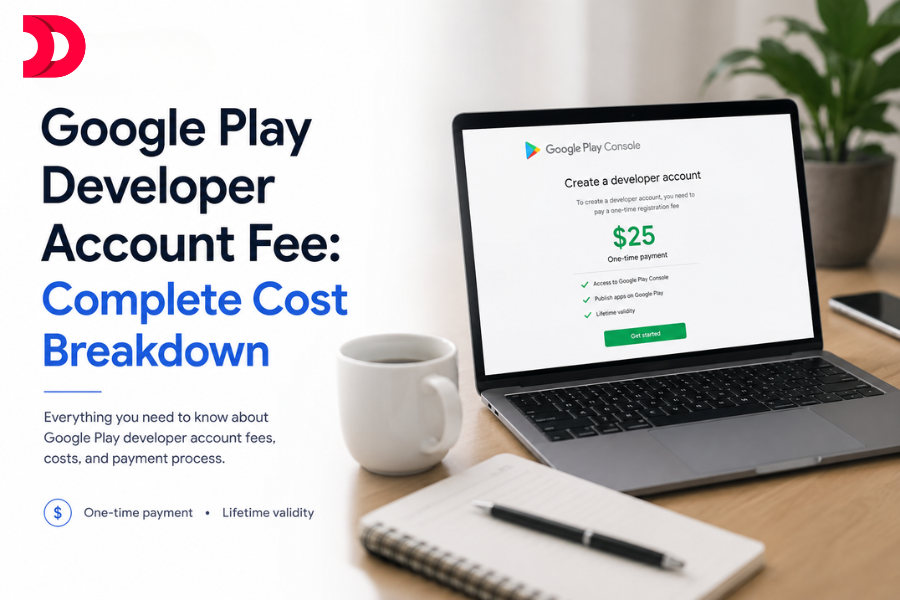
The Google Play Developer Account fee is a one-time payment of $25 (approximately ₹2,100 to ₹2,200 depending on exchange rates). Once you pay this fee, you can publish unlimited Android apps on the Google Play Store under the same account without any annual renewal charges. However, developers should also consider other expenses such as app development, Play Store commissions, testing, maintenance, and marketing costs before launching an app.
If you’re planning to publish an Android application in 2026, understanding every cost associated with the Google Play Console can save you from budget surprises and help you launch your app successfully.
What is the Google Play Developer Account Fee?
The Google Play Developer Account Fee is the registration charge developers must pay to publish applications on the Google Play Store.
Without this account, you cannot:
Upload Android applications
Publish app updates
Manage in-app purchases
Access Play Console analytics
Distribute apps globally
Respond to user reviews
Google introduced the fee primarily to reduce spam applications and ensure that only genuine developers publish apps on the platform.
The registration cost is intentionally low, making Android app publishing accessible to startups, freelancers, businesses, and independent developers.
How Much Does a Google Play Developer Account Cost in 2026?
Account Type
Registration Fee
Renewal Fee
Individual Account
$25
None
Organization Account
$25
None
Approximate Cost in Different Countries
Country
Approximate Cost
United States
$25
India
₹2,100–₹2,200
United Kingdom
£18–£20
Australia
AUD 38–40
Canada
CAD 34–36
Exchange rates fluctuate, so the exact amount may vary slightly.
Is the Google Play Developer Account Fee a One-Time Payment?
Yes.This is one of the biggest advantages of publishing on Android.After paying the initial $25 registration fee:
Publish unlimited apps.
Release unlimited updates.
Create multiple app listings.
Manage all your applications under one account.
No yearly subscription charges.
This is significantly cheaper than the annual fee required by the Apple App Store.
Google Play vs Apple Developer Program Costs
Platform
Registration Fee
Renewal
Google Play Store
$25
No
Apple App Store
$99/year
Yes
Over five years:
Google Play cost: $25
Apple Developer cost: $495
For startups and indie developers, Android offers a much lower barrier to entry.
What Does the $25 Google Play Fee Include?
Many developers believe they are only paying to upload apps. That is incorrect.The fee unlocks the entire Google Play Console ecosystem.
1. App Publishing
Publish:
Free apps
Paid apps
Subscription apps
In-app purchase applications
2. Global Distribution
Your app can be distributed to users in more than 190 countries and territories.This gives even small businesses access to billions of Android users worldwide.
3. Developer Dashboard
The Google Play Console allows you to:
Monitor downloads
View app performance
Analyze crashes
Track revenue
Manage reviews
Update listings
4. Internal Testing
Google provides:
Internal Testing
Closed Testing
Open Beta Testing
These features help developers identify bugs before public release.
5. Security Features
The Play Console includes:
App signing
Malware detection
Security monitoring
Policy compliance tools
6. Analytics and Reporting
You gain access to:
User acquisition reports
Retention analytics
Revenue reports
Crash reports
Device compatibility information
Individual vs Organization Developer Accounts
Google now allows two types of developer accounts.
Individual Account
Best for:
Freelancers
Students
Solo developers
Independent app creators
Requirements
Government ID
Phone number
Email verification
Organization Account
Best for:
Companies
Startups
Agencies
Enterprises
Requirements
Business registration documents
Company website
Organization verification
The registration fee remains the same for both account types.
Additional Costs Beyond the Developer Fee
The $25 registration fee is only the beginning.Many developers underestimate the actual cost of launching an app.
1. App Development Cost
The biggest expense is building the app itself.
Basic App
Cost:$5,000 to $20,000
Medium Complexity App
Cost:$20,000 to $60,000
Enterprise Application
Cost:$60,000 to $300,000+Factors affecting development costs:
Features
UI/UX design
Backend systems
APIs
Security
Integrations
Testing
2. App Design Cost
Professional UI/UX design can cost:$1,000 to $20,000+depending on complexity.
3. App Maintenance Cost
Most businesses spend:15% to 25% of the original development cost annually on maintenance.Maintenance includes:
Bug fixes
Security updates
New features
Android version compatibility
Server upgrades
4. Hosting and Backend Costs
Apps requiring cloud infrastructure may need:
Database hosting
Push notifications
File storage
APIs
Authentication services
Monthly costs can range from:$20 to $5,000+.
5. Marketing Costs
Publishing an app does not guarantee downloads.Most successful apps invest heavily in:
App Store Optimization (ASO)
Google Ads
Social media advertising
Influencer marketing
Content marketing
Marketing budgets often exceed development budgets.
Google Play Service Fee and Revenue Sharing
Google charges commissions when your app generates revenue.This applies to:
Paid apps
In-app purchases
Subscriptions
Standard Service Fee
Google generally charges:15% service fee on the first $1 million USD of annual earnings for eligible developers enrolled in its reduced service fee program, with higher rates applying in certain cases or after thresholds depending on the business model.
The exact fee depends on:
App category
Subscription type
Developer program eligibility
Revenue level
Subscription Fees
Many subscription apps may qualify for reduced service fees.Google periodically updates these policies, so developers should always review the latest fee structure inside the Play Console documentation.
Hidden Costs Most Developers Ignore
App Security
Security audits:$500 to $20,000+
Legal Compliance
Privacy policies.Terms of service.GDPR compliance.COPPA compliance.Data protection requirements.
Third-Party APIs
Examples:
Payment gateways
Maps
SMS providers
AI integrations
These services usually charge monthly fees.
Customer Support
As downloads increase, support costs also increase.You may need:
Helpdesk software
Support staff
CRM tools
Localization
Launching globally often requires:
Translation
Currency support
Multi-language testing
How to Create a Google Play Developer Account
Step 1
Visit the Google Play Console.
Step 2
Sign in using your Google account.
Step 3
Choose:
Individual Account or
Organization Account
Step 4
Accept Google’s Developer Distribution Agreement.
Step 5
Pay the $25 registration fee.
Step 6
Verify your identity.
Step 7
Complete your developer profile.
Step 8
Start publishing apps.
Payment Methods Supported by Google
Google generally accepts:
Credit cards
Debit cards
International payment cards
Availability depends on your country and banking regulations.
Google Play Developer Account Verification
Google has strengthened verification requirements to improve platform safety.Developers may need to provide:
Government-issued identification
Business documents
Phone verification
Address verification
Website information
Failure to complete verification can result in account restrictions.
Why Does Google Charge a Developer Fee?
Many people ask:“If Google earns billions from commissions, why charge developers $25?”The answer is simple.The fee helps:
Prevent Spam
Without a fee, millions of fake accounts could flood the Play Store.
Improve Security
Verification reduces fraud and malicious apps.
Increase Quality
Developers are more likely to publish serious applications.
Maintain Platform Infrastructure
The Play Console requires continuous investment in:
Security
Analytics
Distribution systems
Developer tools
Is the Google Play Developer Account Worth It?
Absolutely.For approximately ₹2,100, developers gain access to:
Billions of Android users
Global distribution
Enterprise-grade analytics
Testing infrastructure
Monetization tools
Security systems
Very few business opportunities offer this level of market access at such a low entry cost.
Final Verdict: How Much Should You Budget?
Most beginners think publishing on Google Play costs only $25.That is a dangerous assumption.A realistic budget should include:
Expense
Estimated Cost
Developer Account
$25
App Development
$5,000 to $300,000+
Design
$1,000 to $20,000
Maintenance
15% to 25% annually
Marketing
Variable
Third-Party Services
Variable
The $25 developer account fee is simply your ticket to enter the world’s largest mobile ecosystem.
The real investment lies in building, maintaining, and marketing a high-quality application that users actually want to download.
If you’re serious about launching an Android app in 2026, paying the Google Play Developer Account fee is the easiest and cheapest part of the entire journey. The challenge isn’t opening the door to the Play Store. The challenge is creating an app that stands out among millions of competitors and generates sustainable revenue.
Ready to Build Your Android App?
Publishing your app on Google Play is just the beginning. If you’re looking for a trusted Mobile App Development Companyto design, develop, test, and launch a high performing Android application, our experts are here to help. Explore our Mobile App Development Services and turn your app idea into a successful product.
The hospitality sector witnesses a massive shift in terms of customer expectations, bookings, and occupancies. Yesterday’s luxury was defined by plush carpets, and today’s luxury is defined by seamless experiences. Modern travelers cannot wait in a queue at the front...
What if your mobile app could understand what customers need and take the next step for them? That is the idea behind an AI agent mobile app. Instead of making users move through multiple screens, search for information and complete...
Flutter and Kotlin Multiplatform (KMP) both are popular in the corporate world. Selecting between these two platforms for developing business applications, however, depends on various factors. Some of these factors are priority, visual consistency, native performance, and user interfaces. As...
Millions of apps are available on app stores today, but only a small percentage generate meaningful revenue. Many app creators spend months developing an app only to realize they have no clear monetization strategy. Others believe they need millions of...
Banking app projects usually begin with a simple goal: give customers a better digital experience. A few workshops later, the conversation tends to look very different. Product teams start discussing customer onboarding. Compliance teams raise concerns about KYC requirements. Security...
What Does It Mean to Successfully Launch an App in the USA? A successful app launch in the USA means achieving measurable user acquisition, strong Day-7 and Day-30 retention rates, positive App Store or Google Play rankings, and sustainable organic...










 Sep 08, 2026