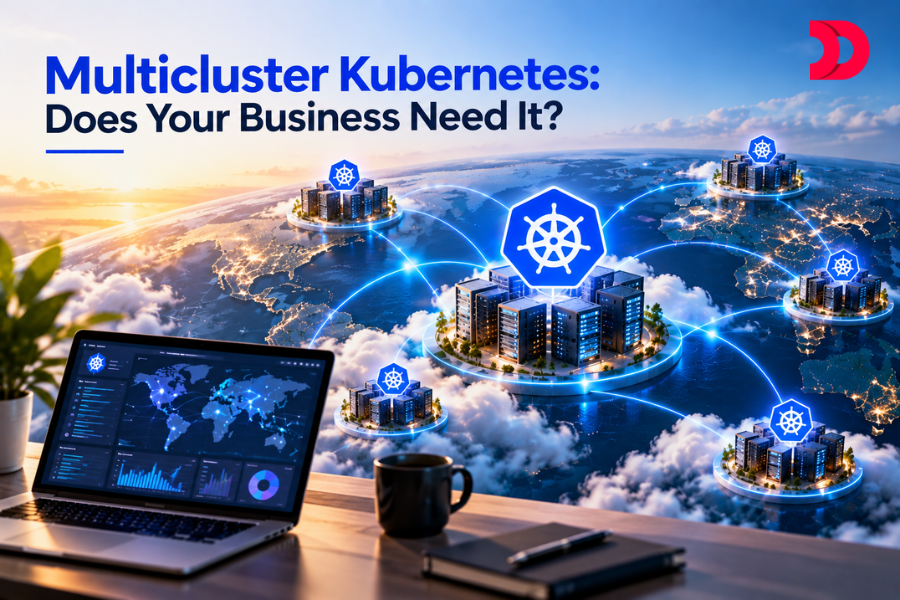
When a single Kubernetes cluster no longer meets your business requirements, you might need to opt for Multi-cluster Kubernetes, multiple independent clusters. Mostly, a single Kubernetes cluster is enough to deploy, scale, and manage modern applications. However, as the company grows, the team, workload, infrastructure, and application requirements can become complex. A single Kubernetes cluster may not be enough. This is where your business needs Multi-cluster Kubernetes. Rather than running your 3 different applications in a single Kubernetes cluster, Multi-cluster Kubernetes allows organizations to run and manage apps in multiple independent clusters. It is an environment where multiple clusters are deployed, scaled, and managed to support business performance, reliability, and manageability.
Now, the question is: does your business need a Multi-Cluster Kubernetes setup, or is a single cluster enough? Let’s find out!
What is Multi-cluster Kubernetes?
Multi-cluster Kubernetes means deploying and managing two or more Kubernetes clusters. For example, you are operating App A in India, App B in Africa, and App C in the USA. Now, you can run all the apps in a single Kubernetes cluster. As your app requirements and workload grow, you might need to expand your infrastructure to multiple clusters to avoid vendor lock-in, reduce latency, improve high availability & disaster recovery, and enable independent upgrades.
Rather than running all applications in a single unified environment, multi-cluster Kubernetes distributes application workloads across the same or different data centers or cloud providers. This Kubernetes Orchestration lets teams manage, deploy, and maintain containerized applications closer to their region, reducing issues where one app crashes the other and helping manage workloads efficiently.
7 Signs that signal it’s time to switch your business to Multi-Cluster Kubernetes
Yes, a single Kubernetes cluster can be easier to manage due to its one shared environment. However, as your application and team grow, so do the team’s requirements, and handling everything under one cluster can become messy; that is when you know you need to switch to Multi-Cluster Kubernetes.
Imagine your company working with 3 teams: backend, ML, and DevOps, and all of them share the same Kubernetes cluster to run the app. But there is a problem: one team is using too much CPU, while another team’s application is communicating with another service, raising security concerns. At this point, what your company needs is a multi-cluster Kubernetes setup: a separate, isolated environment for each team for improved scaling, security, and productivity.
- Regional Latency Distribution
Let’s take the above example again: if your company’s users are located in different regions and manage multiple applications like App A in India, B in the USA, and C in Africa, your users may find it difficult to transfer, respond to, or manage the data of multiple apps in a single cluster.
Responding to or transferring data from app A in India to app B in the USA will take too much time and cannot handle more than 100ms+ cross-region latency. If your business faces this issue, you need independent multi-cluster Kubernetes for each of your users operating in different geographical locations or regions for lower latency, faster response time, and better reliability.
- Data Compliance and Residency
Some regions have to follow certain rules and regulations and have restrictions on sharing personal information. For example, healthcare organizations and financial institutions do not have permission to share patients’ information or financial data outside of their region and must follow certain regulations and regional financial regulations. So, if you are storing all the data in a single cluster, EU-based healthcare organizations that try to access a US cluster may face challenges with data transfer, compliance with applicable EU regulations, and data location. Instead of putting everything into one cluster, having a separate cluster for each region helps keep sensitive data available to those regions. While this step can help manage each region separately, it can increase the operational cost.
Keep your critical application in a separate cluster. If you are working on a very critical app, say a payment processing app, you might want to store all the payment app data in a separate cluster, Cluster A, and run the application development workload in a different Kubernetes cluster, Cluster B, giving each cluster its own control plane to manage its workloads. What will it do? If someone on the team makes any mistakes in the development cluster, it won’t impact the payment cluster, keeping your critical payment-processing app data safe and secure.
Another benefit that might not seem huge is using different cloud providers for your multi-cluster Kubernetes. If possible, use the AWS cloud to store Cluster A data, use Google Cloud to store Cluster B data, and use Microsoft Azure to store Cluster C data. This approach helps with Cloud infrastructure management and avoids relying on a single cloud provider, so even if they leave one cloud, it won’t affect data in other clusters, since those clusters are stored in another cloud. However, managing them can be a hassle; using different cloud providers for each cluster means extra cost, extra storage, and regular Kubernetes upgrades.
One of the major benefits of implementing multi-cluster Kubernetes in your business is giving different teams their own separate cluster. For example, Team A, which handles app development, has to manage its own cluster; Team B, which handles the payment processing part of the app, has to manage its own cluster; and Team C has to manage its own cluster for parts of its other work. This strategy allows teams to manage their own containerization with Docker and Kubernetes without having to depend on other teams’ clusters. Also, if one team makes a mistake, it is easier to identify the responsible team.
Running multi-cluster Kubernetes allows businesses to use different versions of Kubernetes for each cluster, something a single cluster can never do. Say you are running 3 separate clusters: For development testing, you are using Cluster 1, which requires the latest Kubernetes version v1.37.0. For production, Cluster 2 requires a stable Kubernetes version, and for Cluster 3, you can configure your app to use a different CNI. This gives companies flexibility to select only the required version or configuration for clusters. Moreover, organizations can also test different versions of Kubernetes, and if it works fine, then the production cluster can be updated later.
Implementing Multicluster Kubernetes will also allow organizations to work in an isolated environment and keep their highly sensitive application away from other regular apps, maximizing security and protection. For example, businesses can keep regular applications in cluster A, highly sensitive applications in cluster B, and an application that must be accessed only in a specific region in cluster C. So, if any issues occur in cluster A, they won’t affect cluster B, which manages the sensitive application. Or, if an app is required to stay only in a specific region, then the workload can easily be managed within cluster C without impacting the work of another cluster.
Multi-Cluster Deployment Strategies
You’ve determined that your business requires multi-cluster Kubernetes; the next step is to figure out how to set it up and manage it. Well, you can follow these 3 approaches to manage Multi-cluster deployment:
- Do It Yourself Multi-Cluster:
Do-it-yourself multi-cluster gives organizations flexibility to set up and manage multiple Kubernetes clusters to their own requirements rather than depending on third-party Kubernetes distributions. This approach gives businesses control over various things, like avoiding extra costs for Kubernetes management platforms. They can choose when, where, and how to manage clusters, manually update the clusters, and also create clusters in different cloud providers
- Leveraging a Multi-Cluster distributor
Instead of managing multiple clusters on its own, this approach allows organizations to opt for a third-party Kubernetes distributor that provides tools to run, scale, and manage independent Kubernetes clusters for them from one place. Some of the most popular multi-cluster Kubernetes distributors are Anthos, Amazon EKS Anywhere, VMware Tanzu, Red Hat OpenShift, and Rancher by SUSE. This approach will help companies to easily manage multiple clusters, reducing manual effort.
- Using a Multi-Cluster management platform
The last and most suitable approach a business can choose is to use a multi-cluster management platform to manage their independent Kubernetes clusters. A trusted platform like DevsTree provides its own management platform for businesses, allowing them to easily run and manage multiple clusters from a central control plane. At DevsTree, we won’t force you to use a certain configuration, cloud provider, or Kubernetes version; instead, we will let you decide which versions you want to run on your cluster and your preferred cloud provider, and let you configure clusters as per your requirements.
Single-Cluster and Multi-Cluster are important approaches in cloud native architecture. Let’s understand this by looking at the differences between them
| Single-Cluster Kubernetes |
Multi-Cluster Kubernetes |
| If your organization only manages a few applications, then you can be ok with a single cluster |
If your organization is large and manages various applications, then Multi-cluster is a way to go. |
| If you want to store development, testing, and production parts of the app in one cluster, then single-cluster is enough |
If you want to store development, testing, and production parts of the app in a separate cluster, then multi-cluster will be beneficial |
| If your users work in the same region, then single-cluster will be better |
But if your users are spread across different regions, offering them each a separate cluster will reduce latency and improve efficiency. |
| A single cluster is easier to manage |
But Multi-cluster can be tricky to manage and requires extra cost |
| A single-cluster architecture handles workloads through one centralized control plane |
While a multi-cluster architecture handles multiple independent clusters with its own control plane |
| Single-cluster offers one shared environment for all workloads |
Multi-cluster Kubernetes gives a separate isolated environment for different teams and applications |
When you don’t need Multi-cluster Kubernetes?
Now that you know the benefits of multi-cluster Kubernetes, it does not necessarily mean that you should get it too. Ask yourself: do your applications run perfectly fine under a single cluster? If yes, you do not need multi-cluster just because everyone is using it.
Multi-cluster Kubernetes can be useful when you have extremely large applications to manage and require high protection. Moreover, you can use namespaces, RBAC, network policies, and resource limits to easily separate your development, payment processing, and production environments within one cluster and do not require multi-cluster if you are tight on a budget.
If your applications usually require taking multiple backups and disaster recovery, you still do not need multi-cluster Kubernetes. The disaster recovery requirement can easily be fulfilled with a single cluster, while multi-cluster can be expensive and may require regular testing.
Multi-Cluster Management with DevsTree
If your organization also operates across multiple Kubernetes clusters, remember that creating a multi-cluster setup is not the issue, but managing, deploying, scaling, and monitoring them is the hardest part that many companies overlook, which then leads to security problems. This is where you need software architecture consulting from DevsTree, a trusted IT development firm that helps you set up, scale, and manage multiple Kubernetes clusters from one place.
Imagine your company has multiple clusters: some are stored in different cloud providers, some are stored in data centers, while others are stored in different regions/countries. Managing all of these clusters on its own can become tricky, but not with the help of DevsTree. We can help organizations create, update, and manage multiple clusters across different cloud providers, data centers, or regions from one place automatically and securely, so teams and developers do not require to manage them manually.
Final Thoughts
Kubernetes is a container orchestration tool that takes care of deployment, scaling, and management of containerized applications, and multi-cluster Kubernetes helps organizations split the workloads into an independent, isolated environment, keeping the workload of each team secure and easier to manage. Implementing multi-cluster Kubernetes can be beneficial if your company runs multiple big applications, your teams are focused in different geographies, and if you require safe, separated, and scalable environments.












 Sep 10, 2026