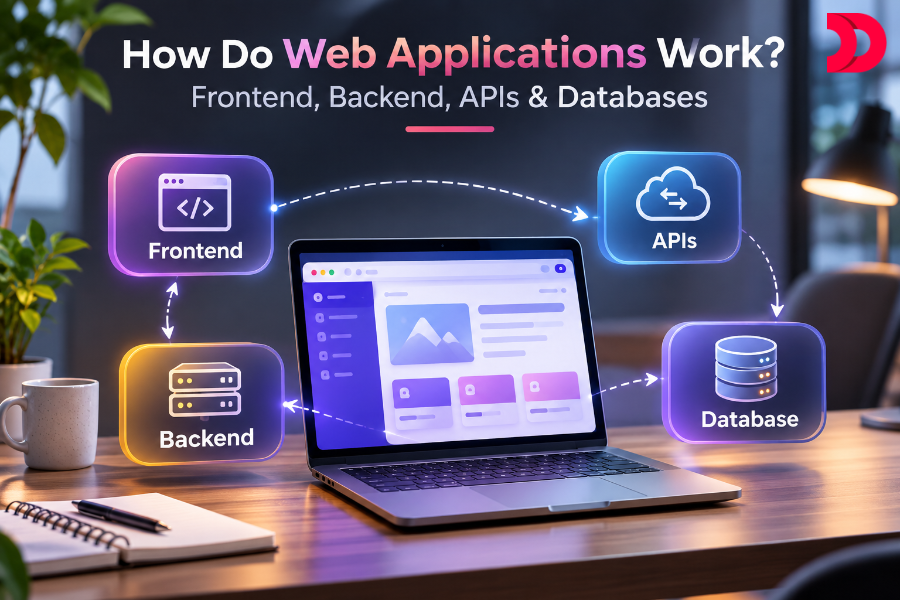
As a user, it is easy to visit a website, scroll, click buttons, and complete any task. But have you ever wondered what work goes behind these efficiently running web applications? Well, 4 main components make any web application work: Frontend, Backend, APIs & Database. Each component plays a significant role and uses different technologies and tools to build a well-optimized web application. If you are a developer or just a fellow reader who wants to understand how web applications work, then this is the perfect time to learn. Let’s understand each layer of web application development in depth. But first…
What is a web application?
A web application is software that users can access over the internet through a browser. A web application can be anything-an online shopping website, a payment website, or a booking system—that users can interact with to perform various activities. But then again….
How does a web application work?
Just like an offline store where you can browse products, get help choosing an outfit, and make a payment, but this is like an offline store, here you do not need to visit a physical store, as you can perform all the activities through a browser.
For example, when you search for clothes in your browser, the browser sends the request to the server, which then processes the request and displays the required result. The web application works similarly. What you see when you visit a web application is the frontend, and when you try to perform any task like adding items to a cart or making a payment, the frontend sends requests to the backend through APIs. The backend receives the request, communicates with the database, and returns a response through an API. The frontend then displays the result on the screen.
What are the main components of a web application?
There are 4 main components of web application development: Frontend, Backend, APIs, and Database. Let’s understand each component and its use in depth.
Frontend is the user part/client side of the web application that users will see first when visiting any website. For example, if you visit an online shopping app, you will see the company’s logo, search option, add-to-cart option, wishlist, checkout buttons, images, menu bar, and layouts are the frontend of the website.
The frontend is the most important component through which users can see and interact. It is crucial to build an attractive, responsive, and user-friendly frontend, as it determines whether users will stay on the site and complete their desired actions efficiently or simply leave the site due to poor navigation and unresponsive design.
Frontend developers design frontend pages with 3 basic technologies: CSS, HTML, and JavaScript, along with various libraries and frameworks like React, Angular, Next.js, and Vue.js. These technologies are also used in MERN stack development.
CSS: CSS stands for Cascading Style Sheets and is a design language used to make a website look visually pleasing by managing colors, fonts, layouts, and responsiveness.
HTML: Hypertext Markup Language uses different tags, elements, and attributes to define the structure and content of web pages.
JavaScript: JavaScript is a programming language that manages the user-interactive part of the website, such as making buttons, animations, and form validation respond to user interactions. JavaScript has many different frameworks and libraries that can be used to build a web application. Let’s understand them better.
React: React is a JavaScript UI Library that divides the user interface (UI) into small components, helping developers create and reuse components.
Angular: It is a front-end framework used to develop dynamic single-page web applications with a strong foundation of TypeScript.
Next.js: It is a full-fledged framework built on React with add-ons for more features, like built-in file-based routing, support for different rendering methods like CSR, SSR, SSG, and ISR, with better SEO. It is a full-stack framework, meaning it can be used for both front-end and back-end.
Vue.js: It is a JavaScript framework used to build interactive UI and single-page applications.
Now we know that frontend development is important for users to access the website, but without Backend development, they can’t complete the task they want to. Backend is the server side of the application that works behind the scenes.
Backend is the part of the web application users cannot see, but without it, the web application won’t work properly. It takes care of everything that is required to run the website effectively, such as the logic behind the website, creating and managing the database, handling requests, monitoring security settings, and preventing hacking.
Backend works in multiple languages such as PHP, C++, Java, JavaScript, Ruby, Python, and Node.js. They work with frameworks like Express, Django, Rails, Laravel, Spring, etc. These technologies are also commonly used in MEAN stack development.
Some commonly used technologies in Backend:
- Node.js: a free, open-source, cross-platform JavaScript runtime environment built for scalable network applications.
- Python: a high-level programming language. It is super versatile. It can read and modify files, handle big data, and perform complex mathematics.
- PHP: a server-side, open-source scripting language used to build dynamic websites and web applications.
- Java: a high-level programming language used to build dynamic websites and web applications.
- C#: an open-source programming language used to build web apps, mobile apps, and gaming apps.
- Ruby: a high-level open-source programming language used to build modern applications and services.
- APIs
The backend is a crucial part of a web application. Even though it works behind the scenes, it handles the application’s core logic. But have you ever wondered how the backend communicates with the frontend? They communicate through an API, which stands for Application Programming Interface.
API development allows different software and applications to communicate and exchange information. In a web application, when a user tries to perform any task in the frontend, like filling out the sign-in form, the API sends the request to the backend. The backend then processes the request, talks to the database if required, and sends back the relevant results, allowing the frontend to display the result.
API follows the request-and-response process: the frontend sends a request, the backend processes it, and responds back through the API. There are various types of API requests one should know:
Common API technologies:
- REST API: the most used API style for applications to communicate with servers. Here, a client sends a request using a URL & HTTP method like GET, POST, PUT, PATCH, or DELETE, and the server responds with the data in JSON format. In this, every request is stateless, meaning the server will not remember past requests.
- GraphQL: With a REST API, sometimes you will get a lot of data, sometimes very little data. GraphQL is a query language that uses a single endpoint. Here, the client will specify the query and the data it needs. But there was one issue with this also, which is caching.
- WebSockets: Technologies like REST and GraphQL close the connection after every request. But what if you want to build an API that allows two-way communication between a client and a server? Technologies like WebSockets keep the connection open so both sides can send messages anytime. For example, a real-time messaging app like WhatsApp.
- gRPC: it uses a binary format. It is built for backend-to-backend communication.
- Database
No matter how small or large your software application is, you need a database to store, organize, and manage a large amount of data. A database is an organized collection of information that helps to store and maintain the data effectively.
For example, if you create an online shopping app, you will require different tables to store different information: product details, user data, payment details, and login details. Each type of data goes into the tables, and the tables are in the database. So, when a client performs an action in the frontend, like adding a product to the cart, the request is sent to the backend. The backend then communicates with the database and provides the response to the frontend, which updates the cart and displays the added product to the user.
Databases are divided into two major categories: Relational (SQL) and Non-relational databases (NoSQL)
- Relational Databases (SQL)
A relational database organizes information into strict rows and columns where everything is connected, structured, and clean. But adding a new type of data requires restructuring everything, which can take time and can be messy. They use SQL (Structured Query Language) to store, manage, and organize the data. Some popular relational databases include PostgreSQL, MySQL, SQLite, Microsoft SQL Server, and CockroachDB.
- Non-relational databases (NoSQL)
Non-relational databases are different from traditional SQL databases. NoSQL databases store data in unstructured formats as key-value pairs. They store data in a flexible JSON-like format and do not follow a strict structure, making it easy to migrate and make changes. Some popular non-relational databases include: MongoDB, Redis, Cassandra, DynamoDB, and Firestore.
How do all 4 layers work together?
After understanding the 4 main layers of a web application individually, let’s see what a real-life web application looks like when we combine the 4 layers together.
Imagine you are using an online food delivery website and want to order some food
Step 1: When you visit an online food website, the first thing you see is a frontend, which will include various buttons to log in, track, add to cart, a search bar, a delivery location, images, food categories, and many more
Step 2: For example, you want to order a pizza, so you type “Pizza” in the search bar. The frontend will send a request to the backend through the API.
Step 3: The backend receives the request. It then searches the database to check whether the product the user searched for exists or is available.
Step 4: If the product is available, the database sends the required information to the backend. The backend then processes and sends relevant data to the frontend through the API.
Step 5: The user will automatically see the variety of pizza options in the frontend
Step 6: The same steps follow when you add any product to the cart; the frontend will request the backend through the API; the backend will check if the product is available and its quantity, and process the order. The backend then stores the information in the database, such as the product name, price, quantity, and user ID. And mind you, this entire process may look like a lot, but it happens within seconds.
How can DevsTree help to build a Web Application?
With so many technologies and frameworks out there, it is very confusing to decide which technologies or tools to use to build your web application. Understanding the four main components of a web application is easy, but choosing the correct technology to actually build an effective web application can be tricky. Today, anyone can build software, but building it in a way that makes it stand out from the crowd is crucial. This is where DevsTree comes into play.
As a trusted IT solutions provider, we first understand the client’s business needs and requirements, technology choices, frameworks, tools, costs, and number of features, and then help them build custom web applications and mobile software. We are backed by an experienced team of developers who have strong expertise in modern and advanced technologies to build reliable, high-performance, and responsive software solutions according to your business needs.
Conclusion
Web development may sound daunting with its different layers, but once you get used to it, it is much easier to understand. Every web application works similarly: the frontend displays the UI, the backend handles the business logic, the API exchanges data between the frontend and backend, and the database stores and manages business data. Ready to build your own web application? Connect with DevsTree today and turn your idea into a powerful digital solution.









 Apr 24, 2026