We Built a Tool That Generates Complete Landing Pages (Frontend + Admin + API) in a very short time – With Minimal Resources
At DevsTree, we prioritize engineering solutions that balance flexibility for our clients with operational efficiency for our team. Recently, our tool of choice for content-heavy sites has been Payload CMS.
We kept running into the same challenge: building landing pages and marketing sites required coordinating multiple resources and significant setup time for databases, APIs, and admin panels.
So we built something to eliminate that dependency entirely
What We Actually Built
A solution that generates everything you need for a complete landing page:
The frontend (fully styled, responsive components that you can reorder and place in any page)
The admin panel (so clients can edit content themselves)
The API (REST endpoints)
The database schema
All of this happens automatically. No backend developer required.
But before we explain the tool we built, it’s important to understand why we use Payload, and the specific gap it fills in our stack.
The Context: Why Payload?
Payload is different from traditional CMSs-you don’t click around building forms. Instead, you write a config file in TypeScript, and Payload automatically generates:
The database structure
REST and GraphQL APIs
A working admin panel
A page builder for creating dynamic layouts
The Business Impact: It effectively eliminates the need for a dedicated backend developer on standard landing pages or admin-panel projects. A frontend developer can define the config, get the APIs they need, and integrate the frontend immediately.
The Problem: The “Setup Fatigue”
However, this “code-first” flexibility comes with a cost. Every time we spin up a new client project, we face Setup Fatigue.
Since Payload is config-based, standard architectural components-like Headers, Footers, and recurring page-builder blocks-need to be manually defined in the code for every single project.
Even worse is the challenge of adding these features to an existing project. Trying to merge complex UI logic into a client’s live payload.config.ts without accidentally overwriting their schema (and bringing down their API) is a high-risk operation.
We decided to solve this. We didn’t just want a standard plugin; we wanted a self-installing system that could surgically inject UI architecture into an app without breaking what was already there.
Here is how we built the Theme Blocks and Theme UI system to automate our frontend workflow.
How We Solved It: The “Append-Only” Architecture
Whether you are spinning up a brand-new project from a template or upgrading a legacy application with years of data, modifying the core configuration is always risky. A careless manual merge can easily break the frontend of a fresh build or, worse, corrupt the schema of a live production site.
We engineered our system to be strictly non-destructive and universally compatible. Whether the project is new or old, our plugin doesn’t replace your architecture-it extends it.
1. Safe Global Injection (Headers & Footers) For site-wide elements like Headers and Footers, the plugin avoids conflicts by namespace isolation. Instead of overwriting your existing header or footer globals, it injects distinct entities (e.g., theme-header, theme-footer) into the Payload config.
The Benefit: Your existing live site continues to use your old header without interruption. You can configure the new Theme Header in the background and switch over only when you are ready.
2. Smart Block Merging For the page builder, we developed a recursive injection engine. The plugin scans your config, hunts down the specific layout field (regardless of how deeply nested it is inside Tabs or Groups), and performs a “Smart Merge.”
The Logic: It creates a new array that contains […YourExistingBlocks, …OurNewThemeBlocks].
The Result: If you have 20 custom blocks defined for a client, they stay exactly where they are. Our 7 new Theme Blocks simply appear at the bottom of the list as new options for the content editor.
This ensures complete Type Safety using Payload’s native definitions and guarantees that previous data remains accessible. You can install this on a 2-year-old production site, and not a single byte of existing data will be touched.
Making It Painless: The Installation CLI
Great architecture is useless if the Developer Experience (DX) is painful. We didn’t want the team to struggle with version mismatches or complex installation instructions.
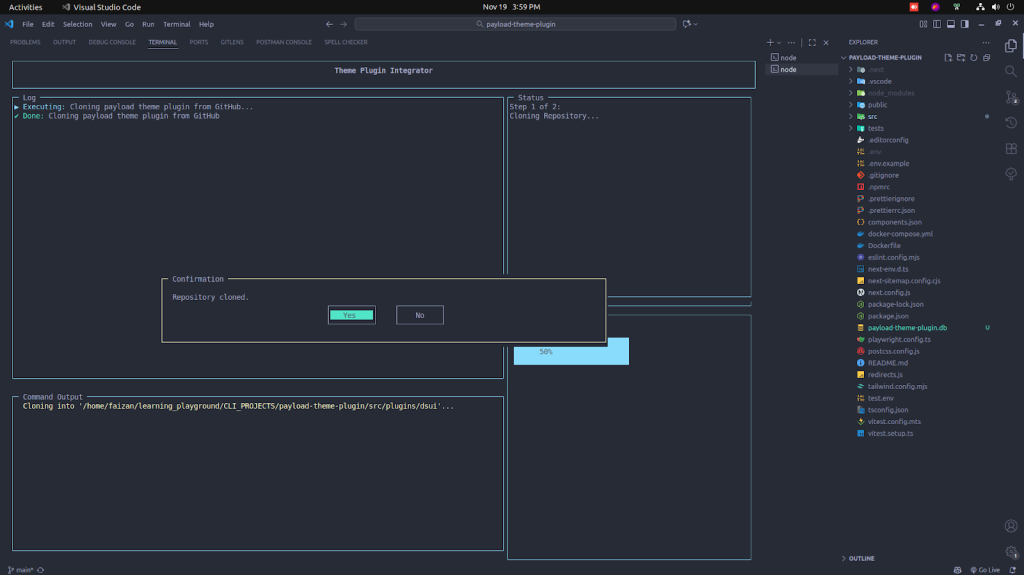
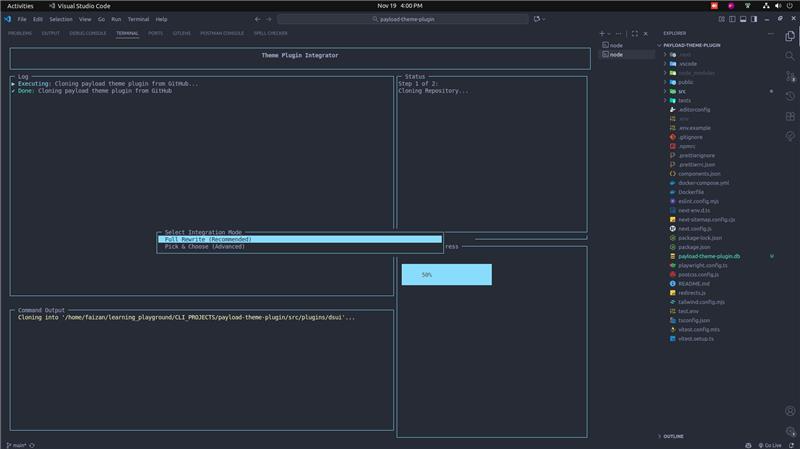
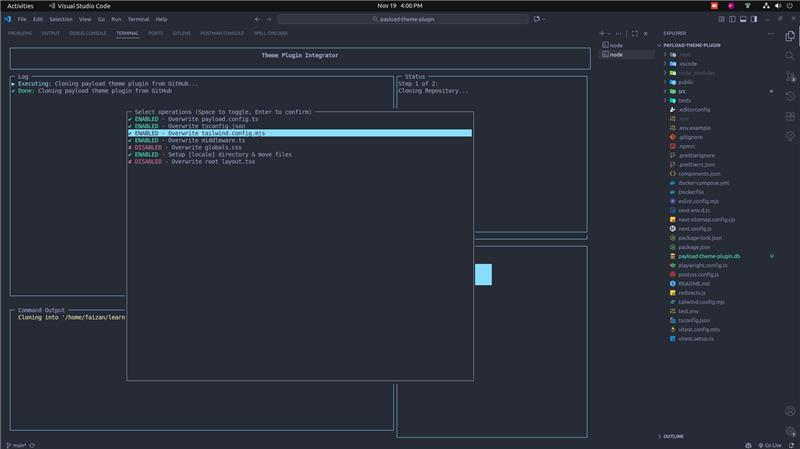
We developed a custom interactive CLI script that wraps the installation process. It runs in two specific modes to give developers full control:
Overwrite Mode: For fresh projects, it scaffolds the entire application structure, setting up locales, tailwind configs, and directory paths automatically.
Manual Selection Mode: For existing projects that need precision. The CLI allows developers to interactively select exactly which files to replace. If they prefer total control, the tool provides standalone “example” files. This allows developers to copy-paste specific configurations (like globals.css or middleware.ts) into their project manually, ensuring they only touch what they intend to.
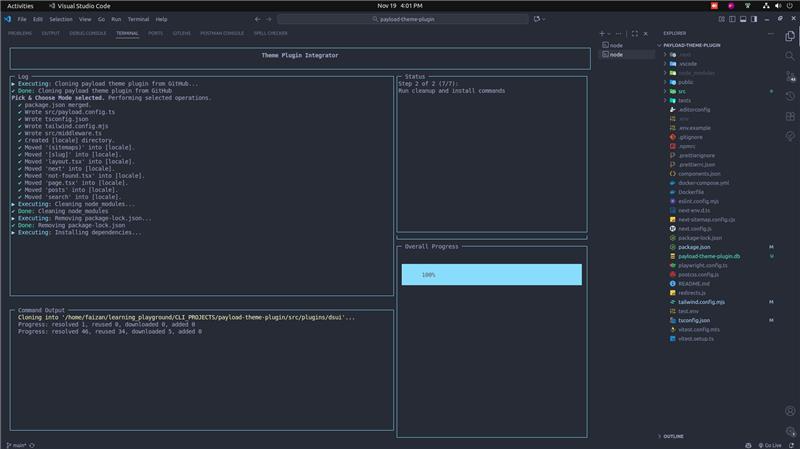
The CLI handles the “dirty work” we all hate: cleaning node_modules, resolving dependency conflicts between Payload versions, and installing necessary UI libraries (like ShadCN) automatically.
The Complete Workflow: Three Commands, Five Minutes
The result of this automation is that a frontend developer can now spin up a fully functional, enterprise-grade site in three commands:
npx create-payload-app@latest my-project
npx add-theme-plugin
pnpm dev
In under 5 minutes, they have a complete website with a professional admin panel, rich content blocks, and fully responsive design-ready to go.
Key Capabilities: A Full-Stack Solution
Most Payload plugins only solve half the problem-they might add a field to the database, but they leave the frontend implementation entirely up to you. We designed Theme Blocks and Theme UI to be a complete ecosystem.
Here is what makes this architecture unique:
True “Full-Stack” Portability: The plugin doesn’t just inject backend schemas. It delivers the Admin Panel configuration, the API endpoints, and the styled React components all at once.
Native Internationalization (i18n): Global support isn’t an afterthought. The architecture comes pre-wired for multi-language support (defaulting to English and Spanish), saving days of setup time.
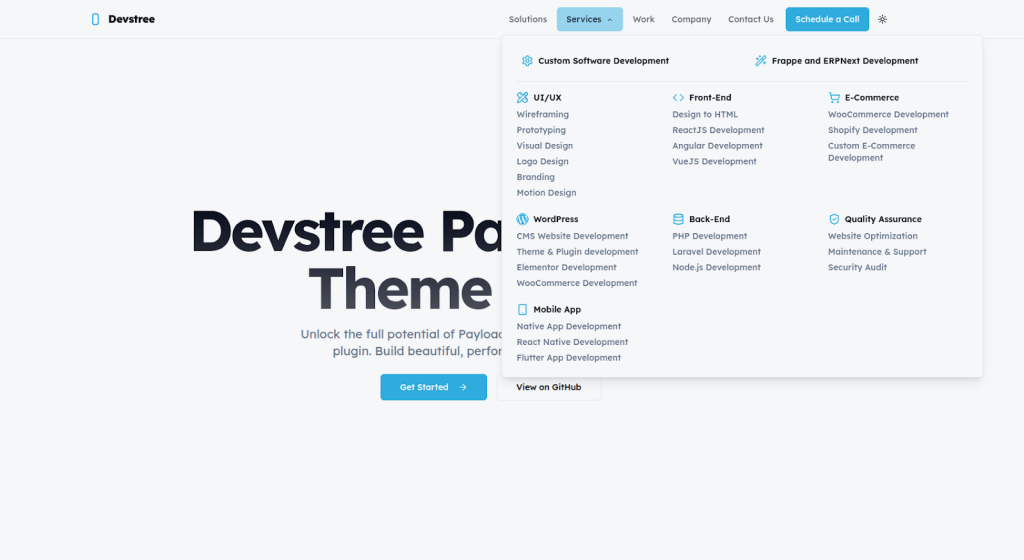
Enterprise-Grade Navigation: The Theme UI plugin instantly deploys a complex, multi-level Header (featuring desktop mega-menus and mobile sliding drawers) and a robust multi-column Footer, fully editable via the Admin Panel.
Production-Ready Component Library: The Theme Blocks plugin provides a suite of polished, responsive UI components-from Video Banners to Testimonial grids. These aren’t wireframes; they are fully styled and accessible from day one.
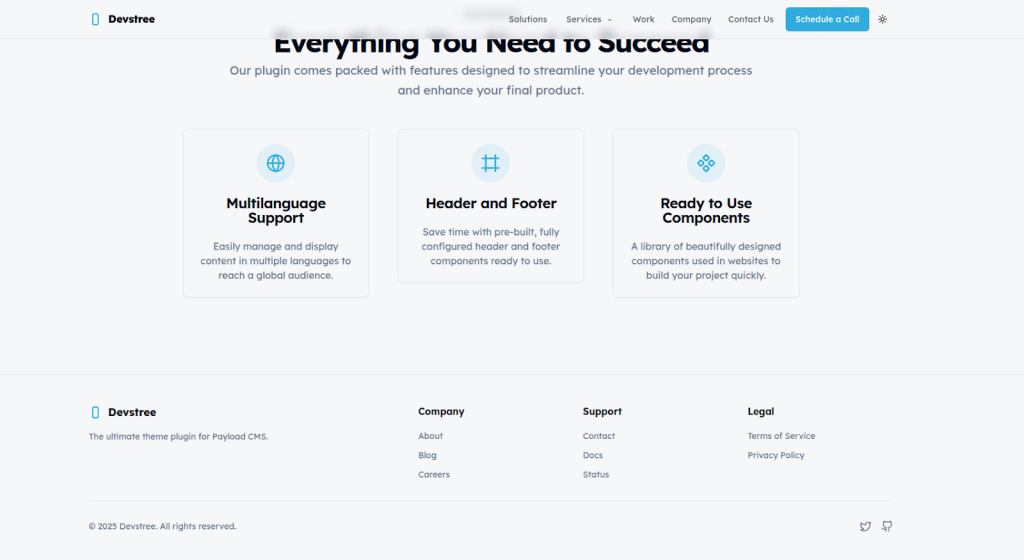
Below is an example of the boilerplate landing page that will be created by using our plugin:
Real-World Impact
This project wasn’t just about writing clever abstractions. It solves actual production challenges we face at Devstree:
Rapid Multi-Site Deployment: We can launch a new branded website in minutes instead of weeks. One command delivers a complete, professional site.
Zero-Downtime Upgrades: We can add comprehensive theming to a production website without taking it offline. The non-destructive approach means existing content keeps working while new features become available.
Developer Efficiency: Frontend developers can deploy complete sites without waiting for backend developers to create APIs, database schemas, or admin interfaces. The Payload configuration handles all of that automatically.
Risk Mitigation: Junior developers can now enhance client projects with complex tools without the fear of accidentally bringing down the production database.
Final Thoughts
The most valuable engineering isn’t always the most complex algorithm. Sometimes it’s about removing friction from daily workflows, so teams can focus on building what actually matters for clients. Our Theme Blocks are built to plug directly into modern frontend stacks. See how our ReactJS Development Services help brands launch faster with reusable UI.
In today’s competitive digital landscape, having an outdated website can directly impact your business growth. Companies are increasingly investing in website redesign services to improve user experience according to research by Gartner, boost conversions, and maintain strong search engine rankings....
SaaS (System as a Service) products are gaining popularity quickly worldwide. Whether it is user experience or cost-effectiveness, these products have set milestones in the corporate sector. However, it is essential to ensure that these products should have seamless dashboards...
The United States is the global epicenter for digital transformation and innovative changes. Whether you own a business or a company, you can leverage the advancements of technologies. However, here is a catch. While you have access to the world’s...
Selection of the right ReactJS development partner is one of the most crucial decisions for a business owner or an entrepreneur. As the world of React JS development changes rapidly, your partner should be capable of ensuring the security of...
The Challenge Modern users expect seamless experiences across all their devices. They might start their day on an iPad, switch to an Android phone during their commute, and finish work on a web browser. For subscription-based applications, this creates a...
The Problem Operating a global rental marketplace presents unique payment challenges. Our platform connects merchants who own rental items with customers worldwide, facilitating transactions across borders. While this global reach is essential for growth, it came with significant financial and...











 Apr 24, 2026